Guides
Request a Quote or Project
Before getting started, remember the following differences between Quotes and Projects:
- When you request a Quote, we will send you the cost and estimated turnaround time and wait for your approval.
- When you request a Project, we will start with the project right
away.
You can still receive confirmation of the cost and turnaround time (Project Confirmation), but by default we will consider it approved. - All Quote numbers start with a 'Q'.
- When the quote is approved, the code will change, and the 'Q' will be removed.
To request a quote or project, go to the quick actions button on the top right corner:
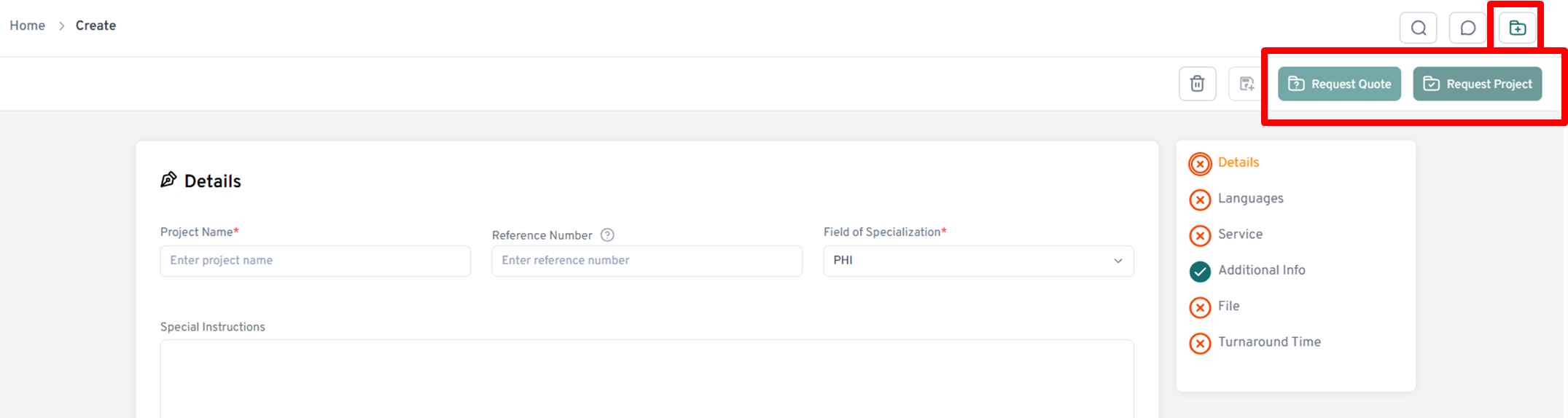
- Fill out the form. Note that it is the same one for requesting a
quote or project. Once you complete it, you decide which of the 2
options you want.
Some of the fields are mandatory before proceeding to the next step. - Insert a project name. Please make it meaningful and easily identifiable for you and the Avantpage PM.
- Insert a field of specialization. Please fill this out if your project requires specific knowledge of a field, such as medicine or legal. If you do not know, please select "General."
- Select the source language of the document that will be translated. Select the target language(s) of the final target files. Multiple selections are possible.
- Select the Service you would like to request.
- Insert any additional information you would like us to include in the Quote/Project, such as billing information (cost center/GL code or PO number) or select additional contacts from your organization that should be included.
- Select the Rush checkbox if you need your quote/project to be expedited. Note that rush fees are applicable, and the PM will confirm the turnaround time.
- Upload work files: the file(s) you'd like to have translated. We prefer editable files such as MS Word, PowerPoint, Excel, InDesign, Publisher, etc. If editable files are not available, PDF* format is acceptable. *Note that PDFs without editable native files may require additional processing and fees.
- Upload reference files: these files are not to be translated but are important for the translation process. Reference files may contain additional information or examples for the linguists, e.g., templates or a previous translation that is similar in style. If you are sending editable graphics files such as InDesign or Publisher, this is a great place to upload a PDF of the English file as a reference for layout and design. Note that reference files are optional.
- Select the proposed turnaround day and time. Your Project Manager will let you know if your proposed deadline is not feasible for final deliveries.
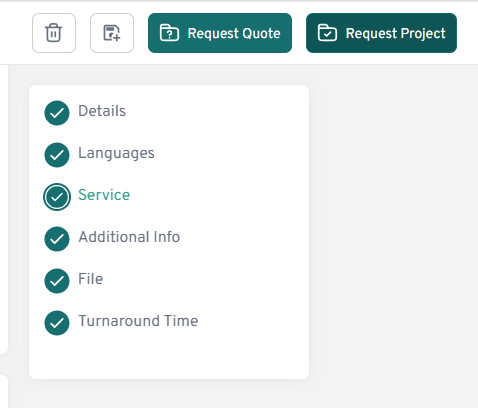
Once all the fields in the form are filled in (make sure the list has green checkmarks in all fields), you can do the following:
- CLEAR - click here to clear the form and start from the beginning.
- SAVE TEMPLATE - click here to save your request with frequently used information and apply it to similar quotes or projects in the future.
- Request Quote or Request Project, depending on your needs. Remember that when choosing to Request Project, you are confirming that you don't need to receive the Quote before we start processing the files for you.
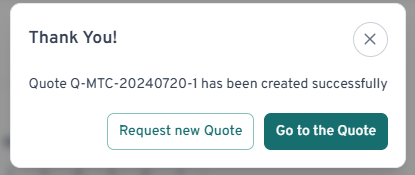
The Portal will then acknowledge your submission.